Deploying a System Definition File
You must deploy the system definition file to a target to run a model.
Pre-requisite {#section_nzf_z4v_mtb .section .mmpdf:paraDef:title_sub}
-
Verify the system definition file contains the models you need.
-
Verify that the RT target is running VeriStand support files.
-
Launch the VeriStand Editor on the development PC.
Procedure {#section_ew4_1pv_mtb .section .mmpdf:paraDef:title_sub}
-
Open the system definition file in System Explorer.
-
Set the controller and IP Address of the target.
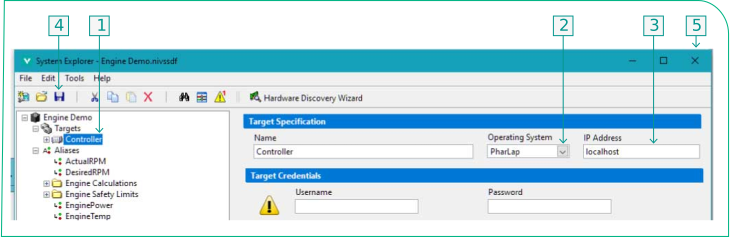
|1|Select the controller in the tree.| |2|Select Linux\_x64 as the operating system.| |3|Enter the IP address of the target.| |4|Click Save.| |5|Close the System Explorer.| -
Select Operate»Deploy in the VeriStand Editor.
Parent topic:VeriStand Procedures